
Dealing with Bias and Diversity in media generation
AI generation models may inherit and amplify biases present in their training data, sometimes resulting in stereotypical or exclusionary representations. As users, we have the opportunity—and responsibility—to steer outputs toward greater diversity, accuracy, and fairness through careful prompt design. However, it’s important to recognize that while we can mitigate bias, we must also take care not to introduce new biases in our efforts. Always strive for balanced, nuanced, and mindful representations.
This tutorial shows how to identify common mistakes and correct them using p-image (text-to-image) and p-image-edit (image editing) via the Replicate API.
For each example, we first generate with a vague or biased prompt (the mistake), then fix it with p-image-edit (the correction).
Note: No AI model is free from bias. While prompt design can help balance and expand representation, it cannot eliminate all bias. The choices you make when crafting prompts directly impact model outputs, so it’s important to reflect on the potential effects and aim for inclusiveness and fairness.
Setup
Let’s start by installing the necessary packages.
[ ]:
%pip install replicate openai
And then we can import the necessary libraries.
[ ]:
import io
import os
from IPython.display import Image, display
from replicate.client import Client
import random
from openai import OpenAI
import base64
Now, let’s initialize our clients for generation and editing.
[ ]:
token = os.environ.get("REPLICATE_API_TOKEN")
if not token:
    token = input("Replicate API token (r8_...): ").strip()
replicate = Client(api_token=token)
[34]:
openai_token = os.environ.get("OPENAI_API_KEY")
if not openai_token:
    openai_token = input("OpenAI API key (sk-...): ").strip()
openai_client = OpenAI(api_key=openai_token)
Example 1: Practicing nuance in subject descriptions
When describing people, think carefully about the traits you mention. If specifying attributes, do so with intention, ensuring diverse and inclusive representation over multiple generations—while remembering that not every attribute is always necessary or relevant.
Physical features (if contextually appropriate): e.g., “elderly East Asian woman”, “tall man with curly hair”
Gender and expression: “non-binary person”, “masculine-presenting woman”, “androgynous teenager”
Body type: “plus-size adult”, “athletic build”, “petite frame”
Age range: “young adult”, “middle-aged,” “senior”, “child”
Use such descriptions to increase accuracy or inclusivity, but avoid reinforcing stereotypes or “typecasting” by repeating the same combinations.
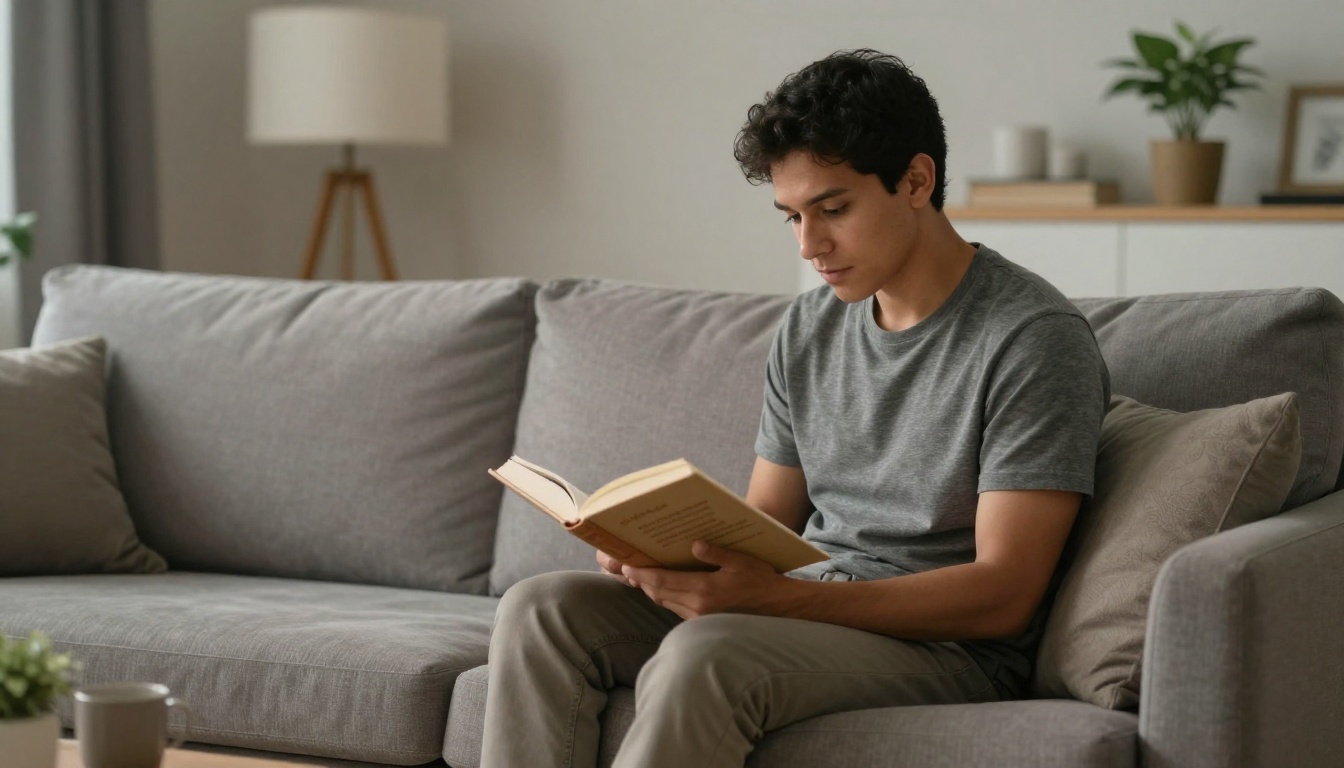
Mistake: Vague prompts like “a person” often default to model biases (e.g., young, Western-coded).
Correction: Use p-image-edit to transform the output toward diverse, intentional representation.
Step 1 (p-image): Generic prompt — likely biased default
[14]:
prompt = "A person reading a book in a living room, photorealistic"
output = replicate.run(
    "prunaai/p-image",
    input={"prompt": prompt, "aspect_ratio": "16:9"},
)
ex1_mistake = output.read()
display(Image(data=ex1_mistake))
Step 2 (p-image-edit): Correct with nuanced subject description
[16]:
prompt = (
    "Transform the person into an elderly East Asian woman with silver hair, "
    "warm smile, soft knit sweater, preserving the reading pose and cozy armchair"
)
output = replicate.run(
    "prunaai/p-image-edit",
    input={
        "prompt": prompt,
        "images": [io.BytesIO(ex1_mistake)],
    },
)
ex1_corrected = output.read()
display(Image(data=ex1_corrected))
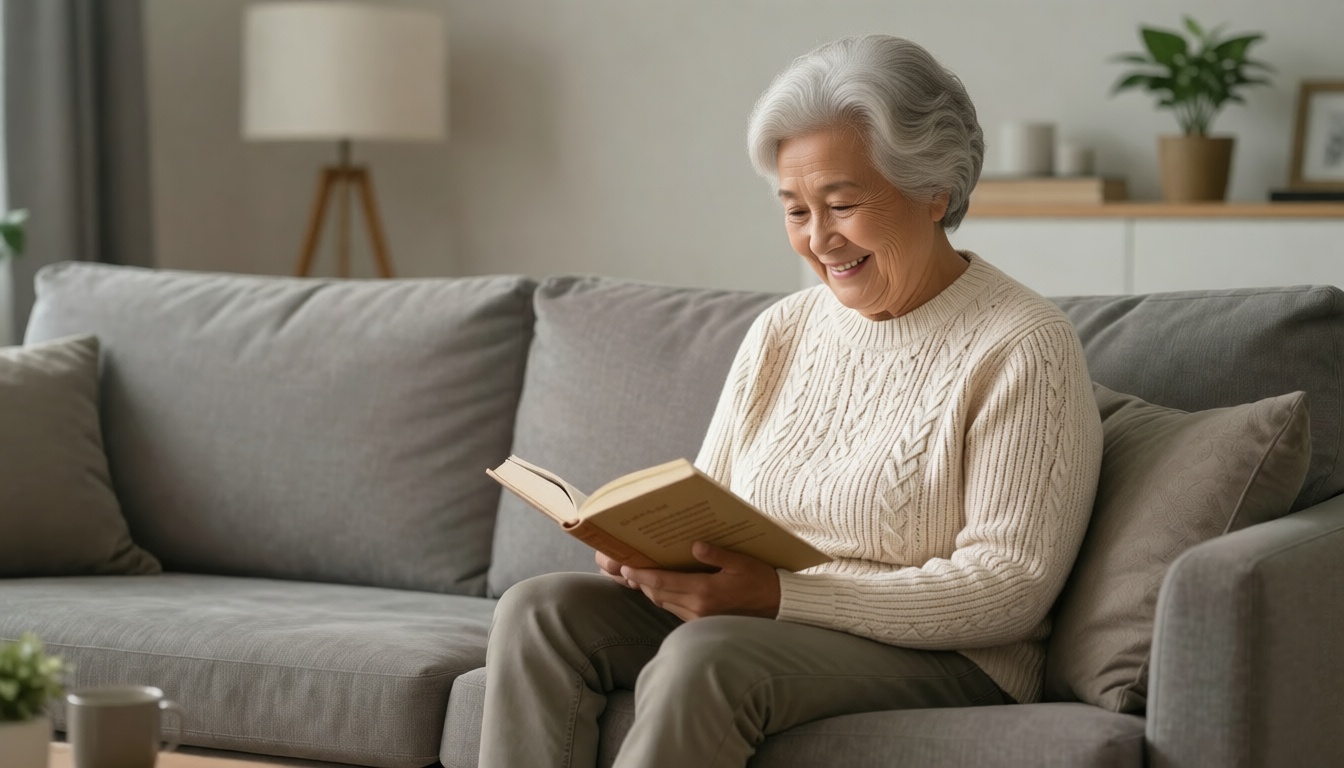
By specifying the age, gender, and clothing, we’ve steered the model away from the default bias of young, Western-coded people reading in a living room.
Example 2: Providing meaningful cultural context and background
Avoid defaulting to generic or reductive generations. Instead, provide additional, specific context that respects the complexity of cultural settings and backgrounds. If mentioning elements, reflect on whether each addition helps create a fuller, fairer picture.
Architectural styles: Describe concrete features or local context, e.g., “a living room with floor-to-ceiling windows and pale wood furniture, inspired by Scandinavian minimalism” instead of just “Scandinavian living room”
Clothing and attire: Mention colors, fabrics, or occasions where relevant, e.g., “wearing a hand-embroidered, brightly colored shawl at a festival” rather than “traditional garments”
Cultural practices: Add specific actions and familial or communal context to avoid flattening traditions, e.g., “a family preparing mole poblano together in a kitchen in Oaxaca,” not simply “cooking Mexican food”
Geographic locations: Evoke setting through mood and detail, rather than default to stereotypes; compare “a sun-dappled alley in a quiet Tokyo neighborhood lined with cherry blossoms” to the more generic “urban Tokyo neighborhood”
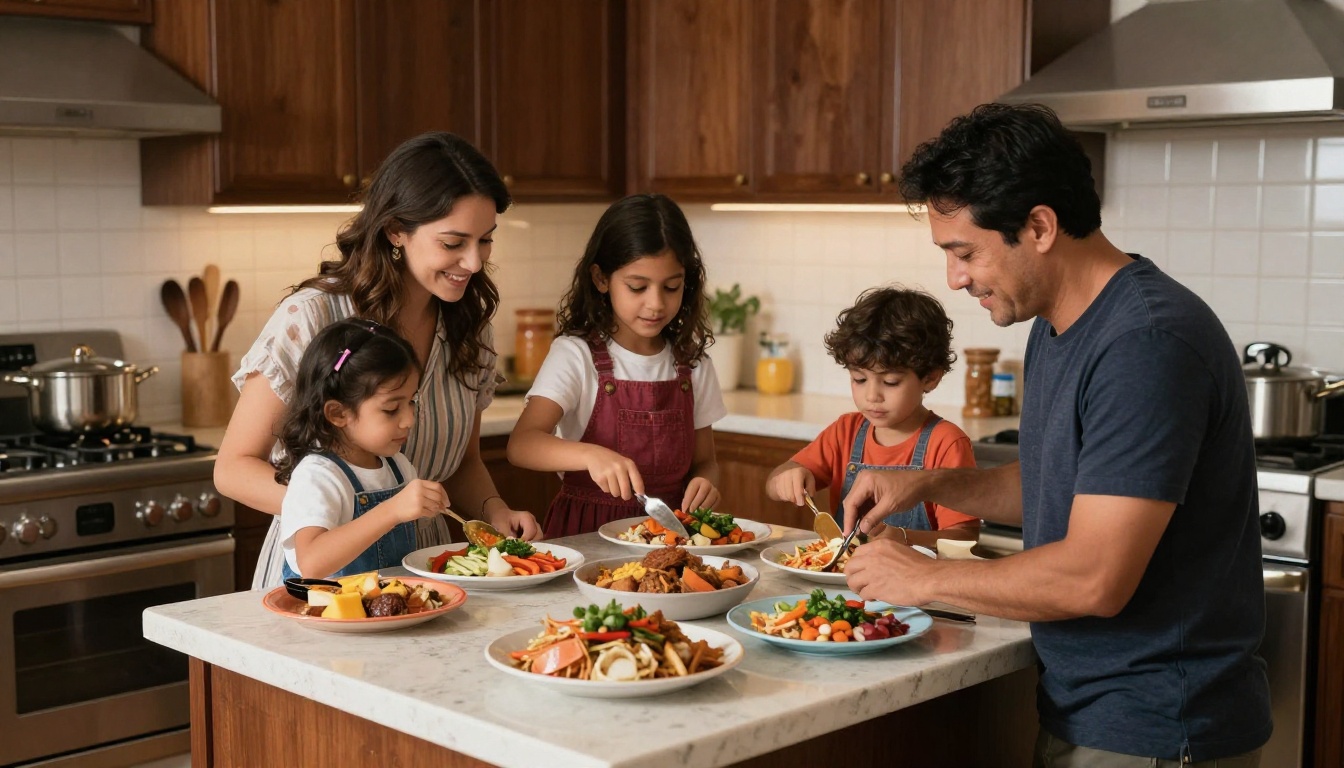
Mistake: “Cooking Mexican food” flattens culture into a stereotype.
Correction: Add specific dish, setting, and details that respect complexity and nuance for different things shown in the photo.
Step 1 (p-image): Reductive cultural prompt
[7]:
prompt = "A family cooking Mexican food in a kitchen, photorealistic"
output = replicate.run(
    "prunaai/p-image",
    input={"prompt": prompt, "aspect_ratio": "16:9"},
)
ex2_mistake = output.read()
display(Image(data=ex2_mistake))
Step 2 (p-image-edit): Correct with specific context
[14]:
prompt = (
    "The woman in the middle is wearing glasses."
    "The food is fried eggs and toast."
    "The man is not smiling and has grayish hair."
    "The left girl has curly hair."
    "The middle girl has freckles."
    "The right girl has short straight hair."
)
output = replicate.run(
    "prunaai/p-image-edit",
    input={
        "prompt": prompt,
        "images": [io.BytesIO(ex2_mistake)],
        "aspect_ratio": "16:9",
    },
)
ex2_corrected = output.read()
display(Image(data=ex2_corrected))
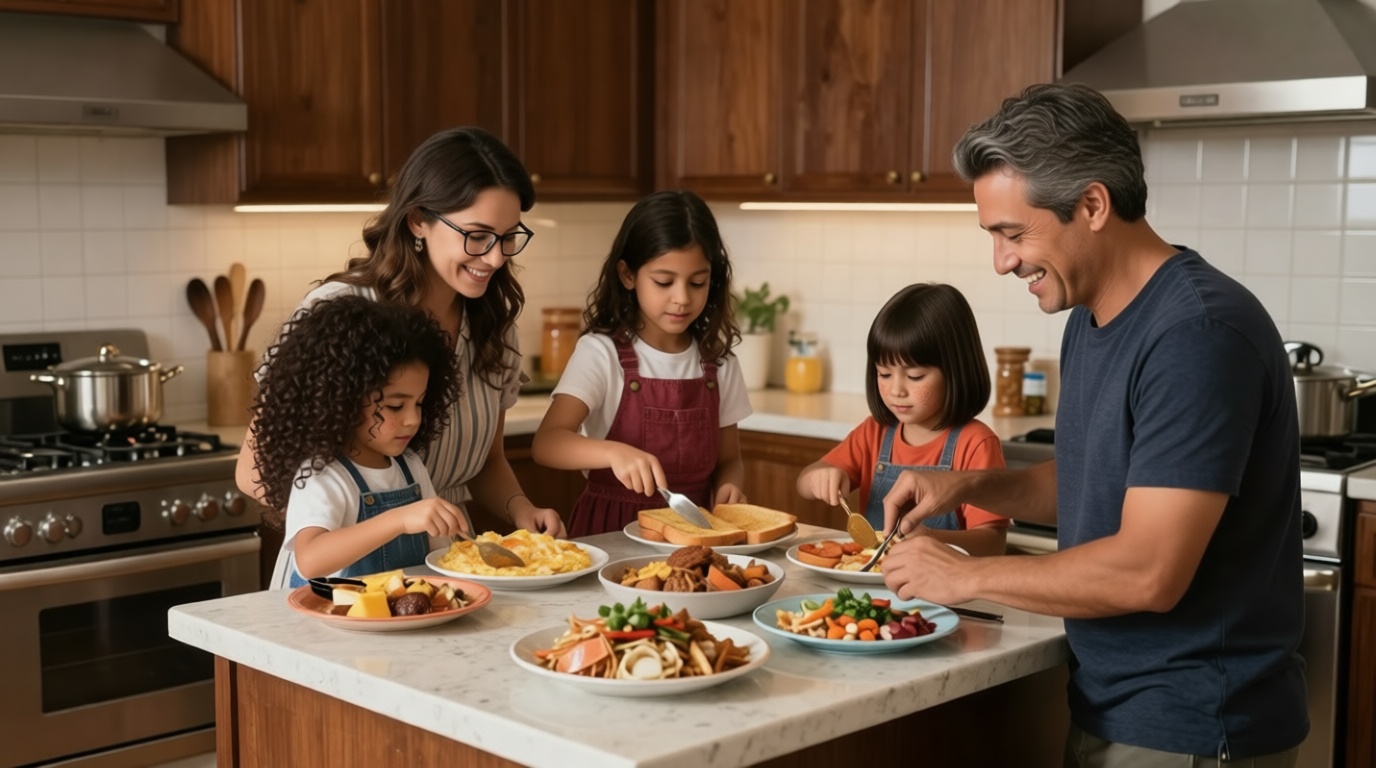
By providing specific details about the food, setting, and clothing, we’ve steered the model away from the default bias of Mexican food and a kitchen setting, but rather steered it to a more nuanced representation of a family cooking together.
Example 3: Encouraging diversity through randomization (mindfully)
To help counter default model biases, consider programmatically adding controlled diversity. This approach can be useful for generating sets of images or results, but be sure to use balanced lists and avoid reinforcing tokenism or artificial quotas.
Random category selection: Draw from thoughtfully constructed lists (e.g., ethnicities, age groups, professions, locations) for broader variety in outputs
Weighted distribution: If you use probability distributions, choose weights to encourage balanced representation, not to mirror real-world inequalities or stereotypes
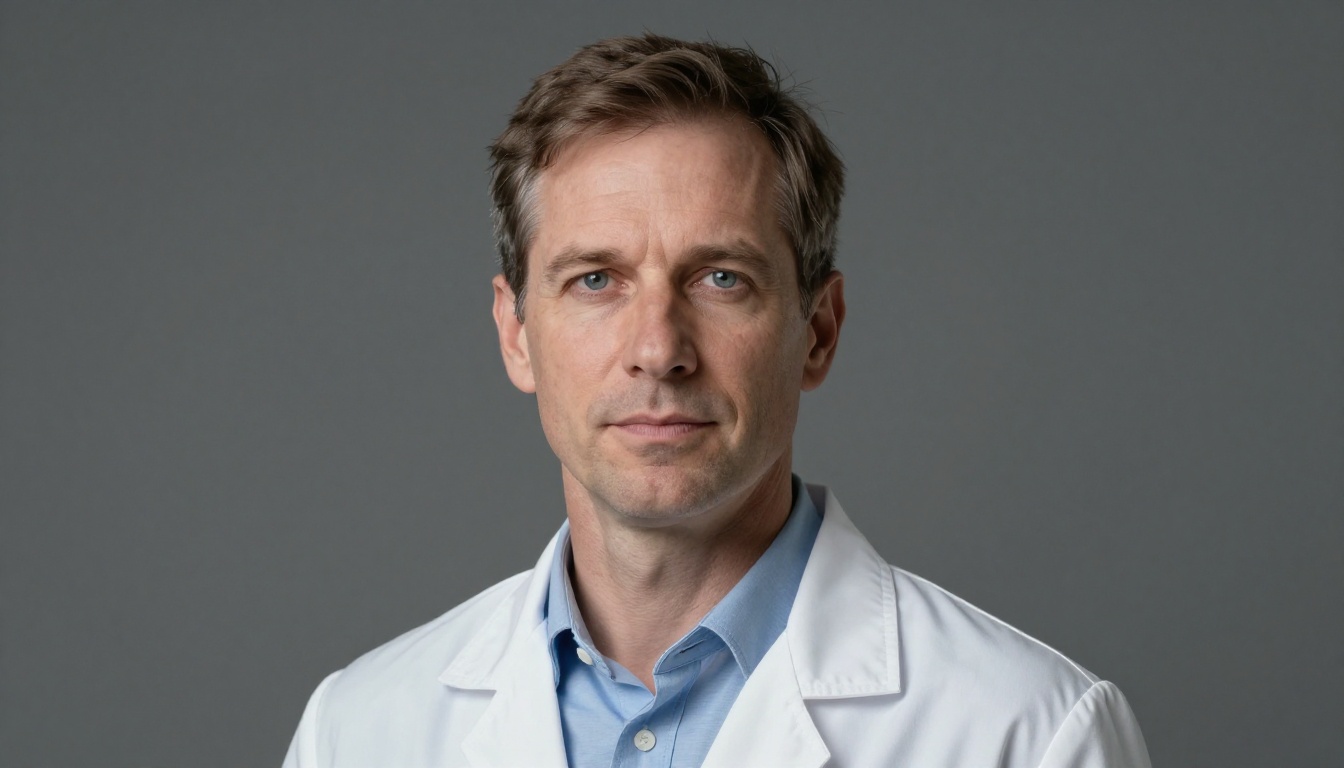
Mistake: “A doctor” often yields narrow default representation.
Correction: Use p-image-edit to diversify the subject while preserving profession and setting.
Step 1 (p-image): Profession-only prompt — defaults to common stereotype
[16]:
prompt = "A doctor, professional headshot, soft lighting, photorealistic"
output = replicate.run(
    "prunaai/p-image",
    input={"prompt": prompt, "aspect_ratio": "16:9"},
)
ex4_mistake = output.read()
display(Image(data=ex4_mistake))
Step 2 (p-image-edit): Correct with diverse representation
For new images, we can use specific prompts so we artifically create diversity. Example implementation approach:
Create category lists:
ethnicities = ["African", "Asian", "Hispanic", "Middle Eastern", "European", "Indigenous"]Randomly select:
random.choice(ethnicities)for a uniform chance, or userandom.choices(ethnicities, weights=[0.2, 0.2, 0.2, 0.15, 0.15, 0.1])to reflect intended diversityCombine:
f"a {selected_ethnicity} {selected_age} {selected_profession} in {selected_location}"
Used thoughtfully, this technique can help you produce more balanced and diverse outputs, but always review and refine your categories and distributions over time.
[ ]:
ethnicities = [
    "African",
    "Asian",
    "Hispanic",
    "Middle Eastern",
    "European",
]
genders = ["woman", "man"]
body_types = [
    "slim",
    "average build",
    "curvy",
    "athletic",
    "plus-size",
    "petite",
    "tall",
]

num_images = 8
images = []
prompts = []

for _ in range(num_images):
    ethnicity = random.choice(ethnicities)
    gender = random.choice(genders)
    body_type = random.choice(body_types)
    prompt = (
        f"Change the subject to a {ethnicity} {gender} doctor, with a {body_type} body, "
        "professional headshot, soft lighting, photorealistic."
    )
    output = replicate.run(
        "prunaai/p-image-edit",
        input={
            "prompt": prompt,
            "images": [io.BytesIO(ex4_mistake)],
            "aspect_ratio": "1:1",
        },
    )
    img_data = output.read()
    images.append(img_data)
    prompts.append(prompt)

rows, cols = 2, 4

# Convert binary images to PIL Images
pil_images = [Image.open(io.BytesIO(img)) for img in images]

# Determine width and height (assuming all are 1:1 and same size)
img_width, img_height = pil_images[0].size

grid_width = cols * img_width
grid_height = rows * img_height

grid_img = Image.new("RGB", (grid_width, grid_height))

for idx, pil_img in enumerate(pil_images):
    row = idx // cols
    col = idx % cols
    x_offset = col * img_width
    y_offset = row * img_height
    grid_img.paste(pil_img, (x_offset, y_offset))

img_io = io.BytesIO()
grid_img.save(img_io, format="PNG")
img_io.seek(0)
display(Image(data=img_io.getvalue()))
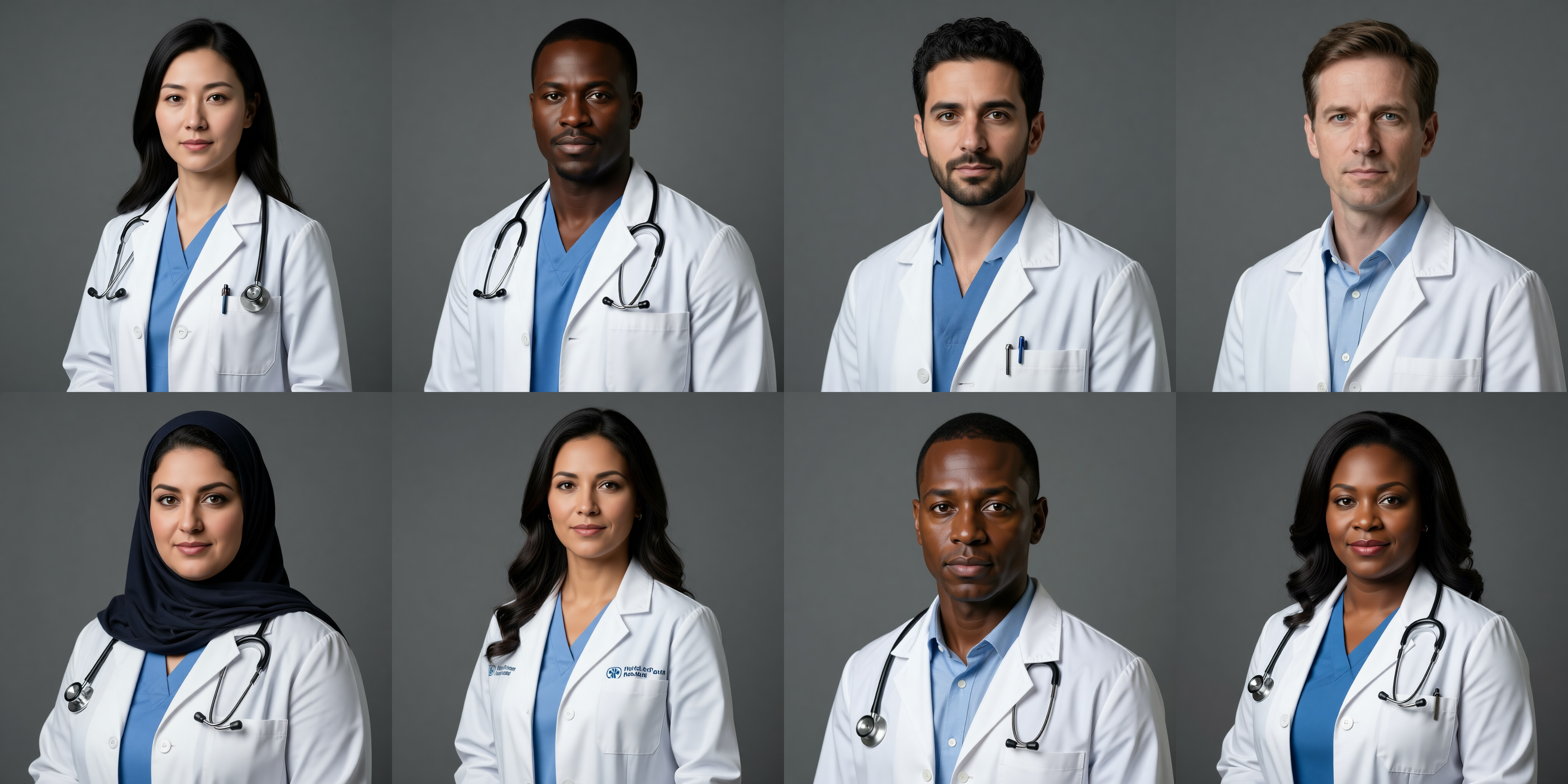
And we’ve got our diversity! Still guided by our own bias, but at least we’ve got a more diverse respresentation of potential doctors.
Example 4: Using VLM to propose diversification edits
Instead of coming up with our own edits, we can use VLM to propose edits to our image. This might introduce some new biases as VLMs hold their own, but it is a good way to automate the process and get a fresh perspective.
[31]:
prompt = "A group of people"
output = replicate.run(
    "prunaai/p-image",
    input={"prompt": prompt, "aspect_ratio": "16:9"},
)
ex4_mistake = output.read()
display(Image(data=ex4_mistake))
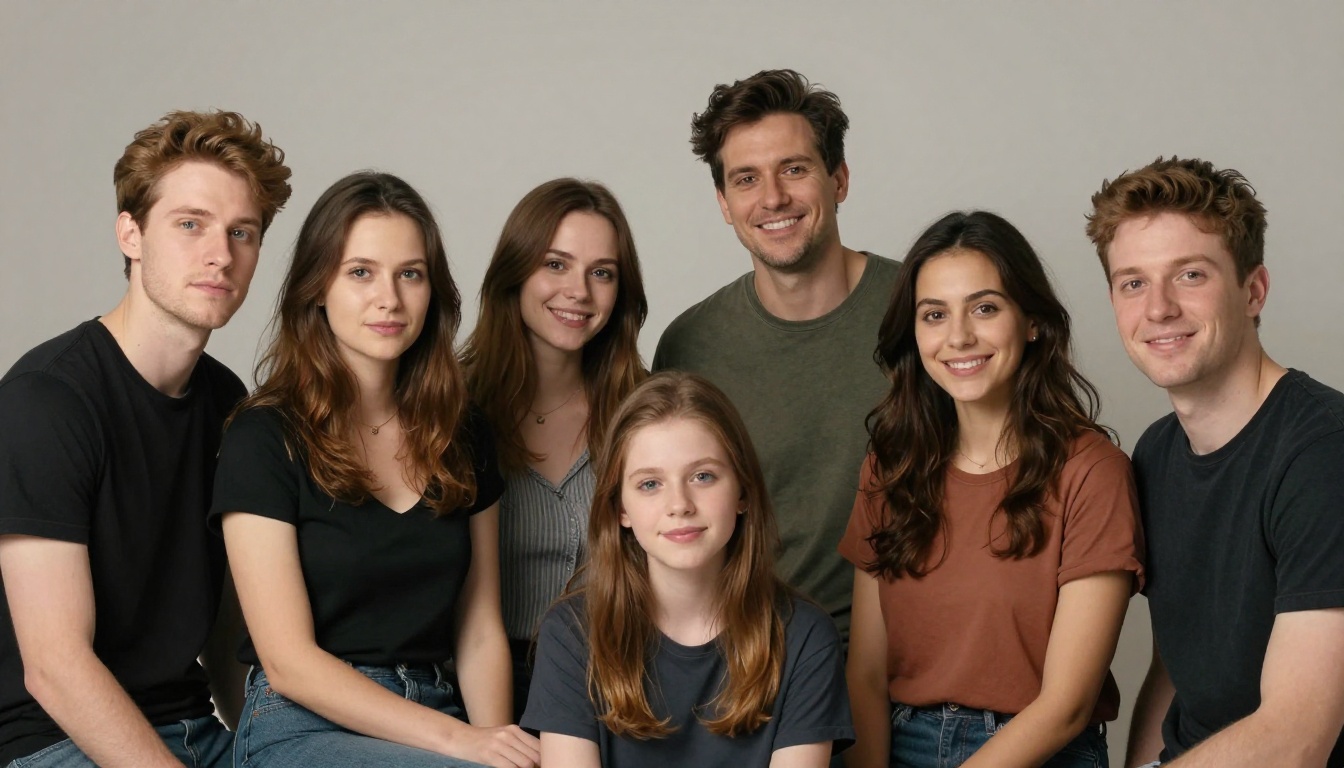
We can see that the group of people is nicely diverse in terms of gender but most of them are young, are wearing general clothes, and seem to represent a Western-centric group of people.
[ ]:
image_base64 = base64.b64encode(ex4_mistake).decode("utf-8")

response = openai_client.chat.completions.create(
    model="gpt-4o-mini",
    messages=[
        {
            "role": "user",
            "content": [
                {
                    "type": "text",
                    "text": (
                        "To avoid bias, analyze this image and propose specific, concrete diversification edits "
                        "to make it more inclusive and diverse. Focus on observable details like "
                        "physical features, clothing, expressions, and setting. "
                        "Output each suggestion as a separate sentence starting with 'The' or 'Add' or 'Change'. "
                        "Use high creativity and suggest specific but simple edits. "
                        "Simple edit targeted at specific details, not the whole image. Example format:\n"
                        "- The woman in the middle is wearing glasses.\n"
                        "- The food is fried eggs and toast.\n"
                        "- The man is not smiling and has grayish hair.\n"
                        "- The left girl has curly hair.\n"
                        "- The middle girl has freckles.\n"
                        "- The right girl has short straight hair."
                    ),
                },
                {
                    "type": "image_url",
                    "image_url": {"url": f"data:image/png;base64,{image_base64}"},
                },
            ],
        }
    ],
    temperature=0.8,
)

vlm_suggestions = response.choices[0].message.content
print("VLM Suggestions:")
print(vlm_suggestions)
VLM Suggestions:
- Change the hair color of the man on the left to a darker shade.
- The woman in the middle is wearing a striped top that could be more colorful to reflect diversity.
- Add a person of a different ethnicity to the group, perhaps with distinct features and hair texture.
- The girl in front has straight hair; change her hairstyle to curly or wavy for variety.
- Change the expressions of the two men on the right to show more joy or playfulness.
- Add accessories like earrings or bracelets to some of the women for added individuality.
- Change the clothing colors to include a wider range of skin tones and cultural styles.
- The girl in the middle could wear a headscarf or other cultural attire to represent diversity.
Now we’ve got our prompt, we can directly use it to edit the image and see what a more diverse group of people looks like.
[50]:
our_edit = replicate.run(
    "prunaai/p-image-edit",
    input={
        "prompt": vlm_suggestions,
        "images": [io.BytesIO(ex4_mistake)],
    },
)
our_edit_img = our_edit.read()
display(Image(data=our_edit_img))
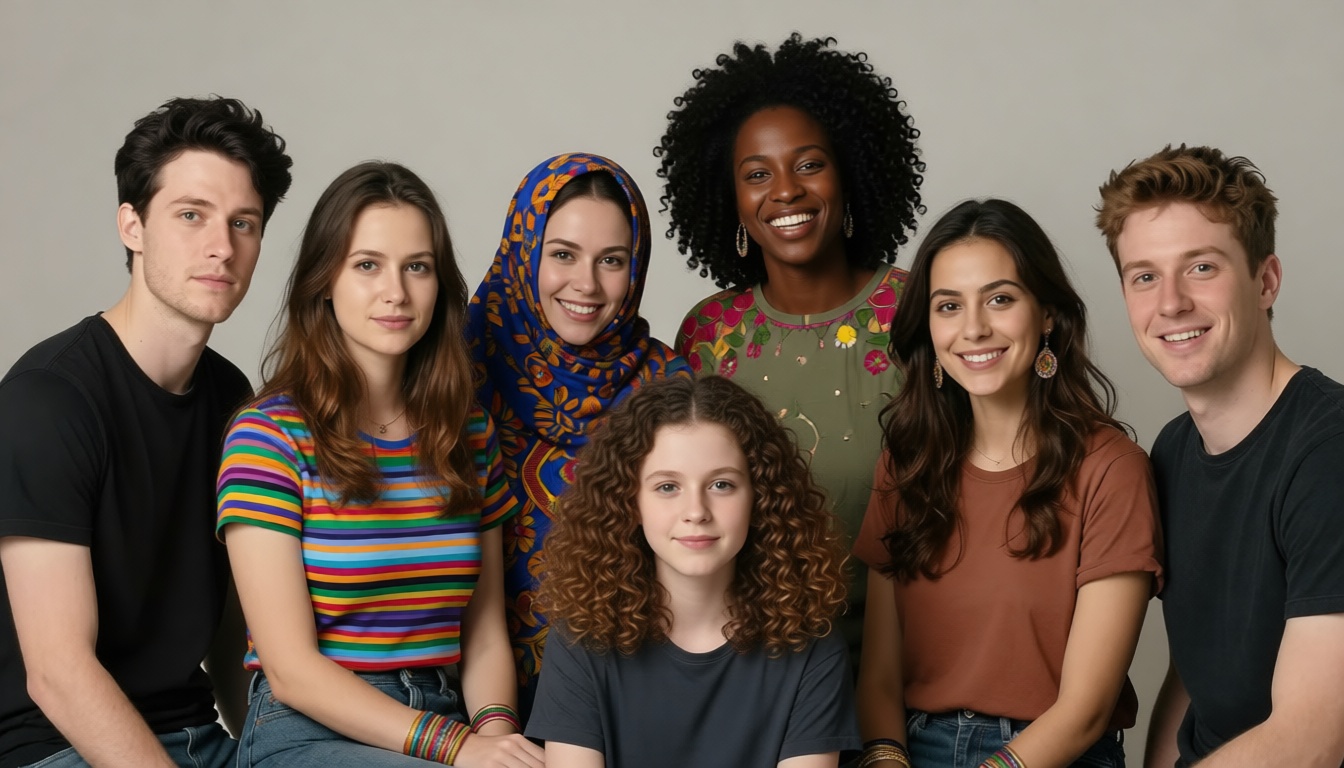
Althought the results are not perfect, it is a good start of an exploratory process and can be used to iteratively improve diversity in a generation pipeline.
Summary
Best practice: Use specific, intentional prompts in p-image from the start. Use p-image-edit when you need to correct or refine existing outputs.
Tip: More explicit and descriptive prompts typically lead to outputs that are both more accurate and more representative. For instance, instead of “a person at a market,” you can specify, “a young Moroccan woman in traditional attire shopping at a bustling souk in Marrakech, with colorful spices in the background.”
When relevant, also add details about motion or point of view to guide the model: “a young Moroccan woman in traditional attire walking through a bustling souk in Marrakech at sunset, colorful spices displayed in the background, handheld camera following from behind.”
In all cases, pause to consider whether your descriptions promote inclusivity and try to be aware of your own stereotypes and assumptions.